(This article discusses a scam that impersonates the Philippine government’s eGovPH app and the Philippine Statistics Authority (PSA). Neither eGovPH, the PSA, nor any of the financial institutions named in this article are involved in the scam, and this article should not be interpreted to state or imply any wrongdoing on their part.)
You get an email and shortly after a phone call from someone claiming your National ID has an urgent issue that needs fixing. They sound official. They know your name, verify your identity and give you clear instructions. To fix the issue, they walk you through downloading what looks like a government app. It feels routine and even helpful. But this is how scammers are targeting Filipinos right now. Here’s what to know, and what you can do to spot it before it causes real harm.
What’s happening
eGovPH is the Philippine government’s official mobile app, designed to give Filipinos easy access to public services from their phones. It stores digital IDs, including the PhilSys National ID, and connects users to government agencies for everything from civil registration to social services. Scammers have taken notice. A fake version of the app is now being used to steal banking credentials and personal data, with scammers posing as representatives from the Philippine Statistics Authority (PSA) or eGovPH support and claiming there’s a problem with your National ID.
The scam is convincing because it’s built to feel exactly like a real government process, and even careful, tech-savvy people have been impacted by it. Our researchers identified the fake app as a banking trojan, a type of malicious software built to steal financial data, and have detected 44 unique variants of it, all designed to look like the official eGovPH app.
How the scam typically unfolds
- The suspicious email. You receive a message from an address like “Nationalidgovernmentph[at]gmail[.]com” with a subject like “National ID Update and Confirmation.” It’s designed to look legitimate enough to prompt a response.
- The phone follow-up. Shortly after, someone calls claiming to be from PSA or eGovPH. They ask for your name and birthday to “verify your identity,” details they may already have, which makes the interaction feel real.
- The video call request. They move the conversation to Google Meet and ask you to share your screen. From there, they can watch everything you do and guide you through the installation in real time.
- The fake download. They direct you to a site outside the official app stores, such as egov[.]vrph[.]cc or egov[.]ncbrgo[.]cc, to download what looks like an eGovPH update.
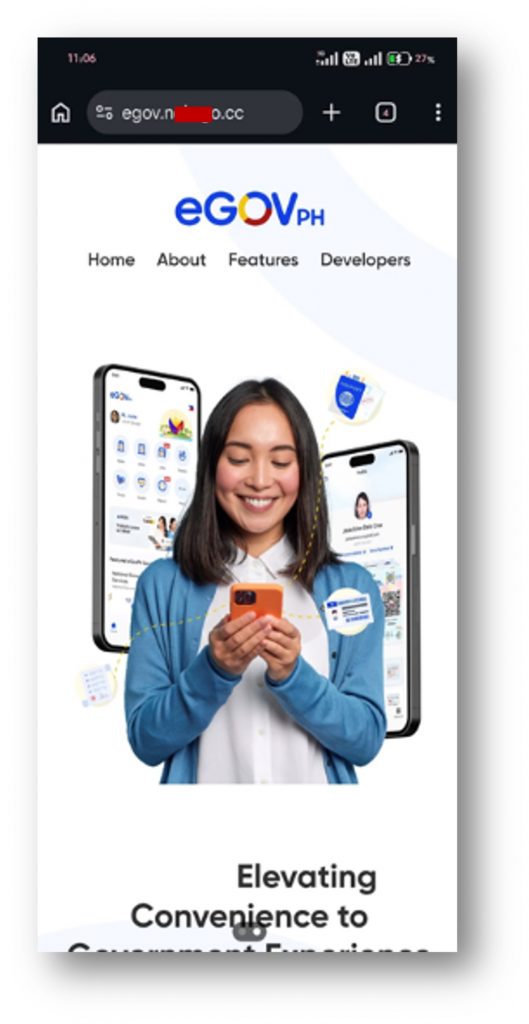
What the app actually does
Once installed, the app runs silently in the background. The icon may disappear from your home screen, but the software keeps running. It’s programmed to start automatically every time you turn on your phone. Here is what scammers gain access to:
- Everything you type. The app captures passwords, PINs, and one-time passwords (OTPs) as you enter them.
- Your banking app credentials. Fake screens overlay your real banking apps and capture your login details when you sign in.
- Your SMS messages. The app intercepts bank verification codes sent to your phone before you even see them.
- Your camera, microphone, and location. These can be activated without any visible sign on your device.
- Your contacts, photos, and personal documents.
The trojan specifically targets major Philippine banks and financial services, including BPI, GoTyme Bank, SeaBank Philippines, BDO, UnionBank, Metrobank, LANDBANK, GCash, and Maya, among others . Beyond draining accounts, there have been reports of scammers using stolen information to take out fraudulent loans in victims’ names.
Once you see the pattern, it becomes much easier to recognize before any of this can happen.
Warning signs to watch for
Here’s what to look out for:
- Unsolicited contact about your National ID. PSA and eGovPH don’t reach out about account issues unless you’ve made a prior request.
- Emails from non-government addresses. Legitimate PSA communication comes from info@philsys.gov.ph, not Gmail or other personal email services.
- A push to move to video call. Scammers escalate to platforms like Google Meet so they can watch you install the app in real time.
- Any request to share your screen. No legitimate government process asks for this. End the call.
- Download links outside official app stores. The real eGovPH app is only on Google Play and the Apple App Store. Domains like .cc, .bond, or .xyz are red flags.
- Being told not to use your phone during installation. This is when the malware gains deep access to your device.
Simple steps to stay protected
- Hang up and verify independently. If you get an unexpected call about your National ID, end the call and contact PSA directly through psa.gov.ph or at info@philsys.gov.ph.
- Only download from official stores. Get the eGovPH app from Google Play or the Apple App Store, never from a link sent in a message or email.
- Never share your screen during app installation. No real government process will ever ask for this.
- Check the URL carefully. Official government sites use .gov.ph domains. Anything else is worth questioning before you click.
- Use anti-scam security software. Dedicated tools are designed to check suspicious messages, links, and phone numbers to catch scams that are built to look legitimate. Trend Micro ScamCheck is designed to do exactly that: take a screenshot of any suspicious message, email, or website and it can tell you whether it’s a threat. You can also use it to verify URLs and phone numbers before you engage.
- Contact your bank if you’ve already installed the fake app. Disconnect from the internet, freeze your accounts, and do a factory reset with professional guidance. Be sure to update all of your passwords in case they were compromised and report the scam to your local authorities.
These scams are sophisticated and designed to feel exactly like legitimate government procedures. The good news: knowing what their tactics look like puts you one step ahead. If you found this helpful, pass it on to someone you know. The more people are aware of how these scams work, the less effective they are.
0 Comments
Other Topics
You Might Also Be Interested In...