That Apple text you just got? Scammers are impersonating Apple and their messages look very convincing

This article discusses a scam that impersonates Apple, including its Apple ID, Apple Pay, and iCloud services. Apple is not involved in the scam, and this article should not be interpreted to state or imply any wrongdoing on their part.
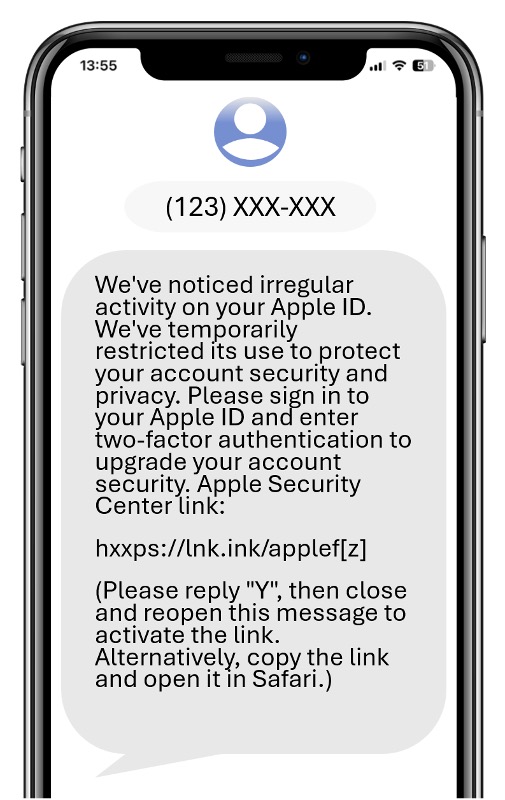
A text arrives: Apple Pay just blocked a transaction you don’t recognize, complete with a transaction amount, a case ID, and a store location. It looks exactly like something Apple would send, and it asks you to call a number to dispute the charge. Apple is the perfect target for impersonators, not because their security is weak, but because their brand is so trusted. The urgency feels real, and that’s the whole idea.
Scammers impersonating Apple are targeting people across multiple countries right now, and their messages are getting harder to tell apart from the real thing. Here’s what to watch for. Check how scammers are weaponizing your trust in Apple and what your family needs to know:
What’s going on
Our researchers have tracked a sharp rise in scams impersonating Apple through text messages, emails, and phone calls. These aren’t rough, obviously fake alerts, they’re polished, detailed, and built to trigger a very human response: the worry that your account, private data or payment information are at risk.
Scammers create that worry using fabricated specifics: a case ID, a transaction amount, a store name, a device location. The details make a message feel legitimate. Once you respond by clicking a link or calling a number, they’re in control. The fake websites they use are alarmingly similar to Apple’s official pages and are built for mobile screens, where it’s harder to check a full web address. Some can even capture two-factor authentication (2FA) codes in real time as you enter them. These scams are sophisticated, and even careful, tech-savvy people can be impacted by them.
How these scams typically play out
Our researchers have identified several versions of this scam in the wild:
- The blocked Apple Pay charge. A text claims a transaction was flagged with a specific transaction amount, store name, and case ID attached. It urges the recipient to call a number to dispute the charge. That number connects to a scammer posing as Apple support, who then works to extract account credentials and payment details.
- The “irregular activity” alert. A message warns of multiple unauthorized sign-in attempts and Apple Pay setup requests from unknown devices. It instructs the recipient to contact “Apple Billing & Fraud Prevention” at a provided number with a line staffed entirely by scammers.
- The credential-harvesting login page. A link in a text or email leads to a polished Apple-looking login screen. Entering an Apple ID and password sends that information directly to scammers. The page then stalls on a loading screen and never actually logs anyone in.
- The wallet alert. A message claims an unfamiliar card was added to an Apple Pay wallet, or that unusual payment patterns were detected and the wallet is now locked. A phone number or link is provided to “resolve” the issue.
- The refund trap. A fake email claims there is a pending subscription overpayment refund. The message is urgent: your refund is on hold and will be lost if you don’t verify your information immediately. Clicking through takes you to a flawless replica of Apple’s login page, localized to the target’s region.
The pattern is consistent: create alarm, then offer a way out that routes through the scammer.
Warning signs to watch for
- An unexpected message about your Apple ID or Apple Pay. Apple never sends unsolicited security alerts asking you to call a number or click a link to fix an account issue.
- Very specific-looking details. Case IDs, store names, transaction amounts, and device locations in a text are designed to look official. Their presence doesn’t mean the message is real.
- A phone number to call. Scammers prefer calls because they can control the conversation. If in doubt, go directly to your country’s official Apple support page and start a support request from there, or call the phone number listed on the official website, not the number provided in the message your received.
- Urgency or a deadline. Phrases like “failing to respond could result in the charge being finalized” or “act now before your wallet is locked” are pressure tactics, not real warnings.
- A link that doesn’t go to apple.com. Apple’s official site uses the format apple.com/[country code]. Tap the address bar on mobile to see the full URL before entering any information.
- Any request for a 2FA code. Apple will never ask you to read a verification code over the phone or send it via text, regardless of what the caller claims.
What you can do
- Go directly to Apple, never through the message. Make it a habit to open a browser and go directly to Apple’s official website. If there’s a real issue it will show up in your account settings, never use any link from a text.
- Never share a 2FA code with anyone. Not over the phone, not in a text. 2FA codes are not meant to be shared, no matter how official the request sounds or who the caller claims to be.
- Update your credentials if you’ve entered them. Go directly to Apple’s official website, sign in from a trusted device, and change your password. Review your security settings and check for any unusual activity on your account.
- Use anti-scam security software. If something feels off, a screenshot is all it takes. Trend Micro ScamCheck can analyze suspicious messages, links, and phone numbers and tell you whether they’re a threat before you respond or click anything.
- Report it. Screenshot suspicious Apple-related texts or emails and send them to reportphishing@apple.com, and report it to your country’s fraud reporting or consumer protection agency:
- Australia — ScamWatch
- New Zealand — Netsafe
- US — Federal Trade Commission
- Canada — Canadian Anti-Fraud Centre
- UK — Report Fraud
These scams are sophisticated and designed to feel like real Apple alerts. The fabricated details, case IDs, store names, blocked transactions, and other details are there to make you react without much consideration. The good news: now that you know the pattern, you’ve already got the upper hand. Don’t act immediately, go directly to Apple’s website instead, and don’t let a sense of urgency make the decision for you.
You’ve got this.
This article is based on findings from Trend Micro researchers and is intended for consumer education and cybersecurity awareness.
0 Comments
You Might Also Be Interested In...