This article discusses a scam that impersonates Amazon. Neither Amazon nor its services are involved in the scam, and this article should not be interpreted to state or imply any wrongdoing on their part.
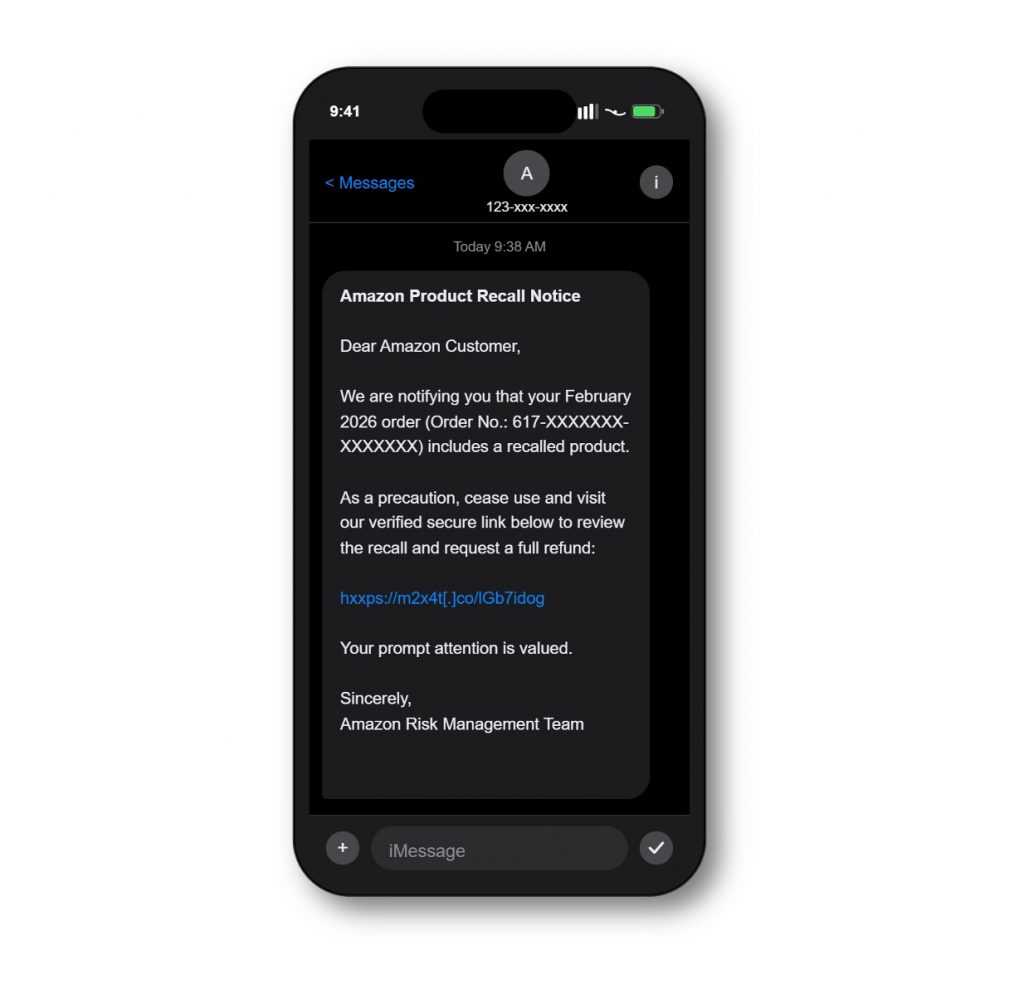
You get a text. It’s from what looks like Amazon. It says a product from your recent order has been flagged in a safety review and is now subject to a recall. There’s an order number. There’s formal language. There’s a link to “review the recall details and submit a refund request.” No return required. It feels official, and just a little urgent.
This is an Amazon product recall impersonation scam, and it’s showing up on people’s phones across the US, Australia, the UK, and beyond. Here’s what’s actually going on.
How this scam works
Scammers send fake SMS messages designed to look exactly like official Amazon communications. The product description is intentionally vague, such as “an item from your recent order,” so almost anyone who has shopped on Amazon recently could believe it applies to them. A realistic-looking order number adds to the illusion.
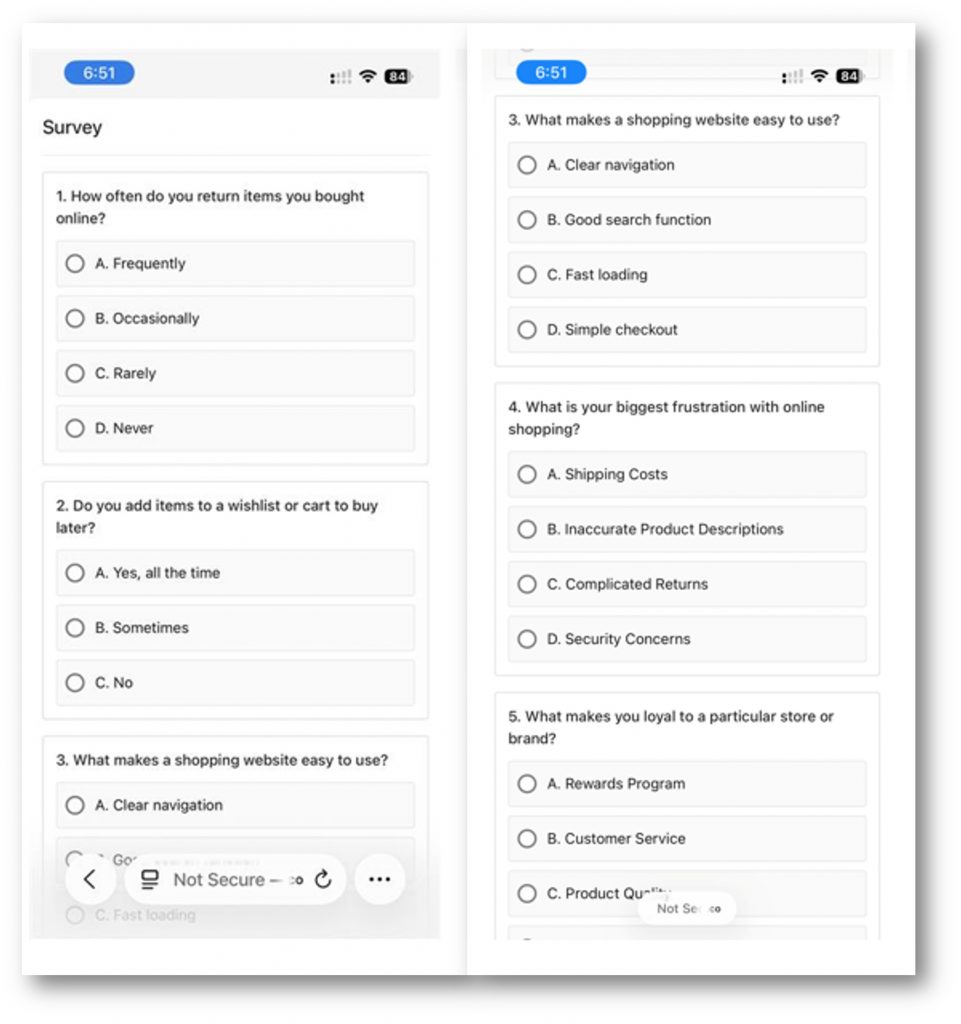
Clicking the link doesn’t lead to Amazon. It takes you to a fake portal designed to look like an Amazon refund or support page. From there, it traps you in a never-ending survey loop: 10 multiple-choice questions about your shopping habits, then a “thank you” screen, then 10 more questions. Throughout this process, scammers are quietly collecting IP addresses, device details, browser identifiers, and behavioral data. That information gets sold on the dark web or used to target you in follow-up attacks.
One variant even redirects to Amazon rainforest conservation pages first, a tactic designed to build trust in Amazon-branded links.
What these messages look like
These attacks rely on a few consistent patterns:
- A realistic-looking order number. Messages include specific IDs like “Order No.: 103-XXXXXXX-XXXX062” to make the recall feel tied to your actual account history.
- Vague but alarming product language. The recalled item is described in general terms so it could apply to almost any purchase, regardless of what you actually bought.
- A full refund with no return required. This is designed to lower hesitation by making the offer seem low-effort and generous.
- A professional, formal tone. Phrases like “please discontinue use immediately” and “your safety is our top priority” mirror the language we might expect of real product safety communications.
- Shortened links that hide where they’re actually going. Scammers use URL shortening services to disguise the final destination. If you expand the link, you’ll find it leads somewhere that has nothing to do with amazon.com.
Red flags worth knowing
Here’s what to watch for:
- Unexpected texts about product recalls. Amazon doesn’t typically reach out about recalls through unsolicited SMS messages.
- Shortened or unfamiliar links. Scammers use URL shorteners to hide the real destination URL so that you’re more likely to click the link.
- Vague product descriptions. Real recall notices identify the specific item, not just “an item from your recent order.”
- Survey-style “verification” pages. Legitimate refund processes don’t involve multi-page shopping habit questionnaires.
- Urgent language about safety risks. Scammers use safety concerns to push you to act quickly in the hopes you won’t take the time to verify the message first.
- Local-looking numbers from unknown senders. These messages often come from local numbers to appear more credible.
What you can do
- Go directly to Amazon. If you’re concerned about a recall, open the Amazon app or visit amazon.com and check your order history there. Don’t use the link in any text message.
- Close the page without responding. If you’ve already clicked, close it without answering any questions.
- Check your accounts. If you did interact with a fake page, review your Amazon account and any linked payment methods for unusual activity. To be safe, change your account password.
- Report the message. In the US report to the FTC. In the UK contact Report Fraud. In Canada, reach out the Canadian Anti-Fraud Centre. In Australia, report to ScamWatch. Reporting helps authorities track and shut down these operations whether money or personal information was lost or not.
- Block and delete. Once you’ve reported, block the sender and remove the message.
- Use scam detection tools. Tools like Trend Micro ScamCheck can detect and block scam texts before they reach you, and can analyze suspicious links and messages to identify threats that look legitimate on the surface.
You’re already ahead
These messages are crafted to feel legitimate, and even careful, experienced shoppers can find them convincing. In our latest consumer research, nearly half of people said they feel only slightly or not at all confident spotting AI-assisted scams, which tells us a lot about how sophisticated these operations have become. Knowing the patterns these tactics rely on puts you in a much stronger position. Take a moment to verify before clicking anything unexpected and trust your instincts if something feels off.
0 Comments
Other Topics
You Might Also Be Interested In...