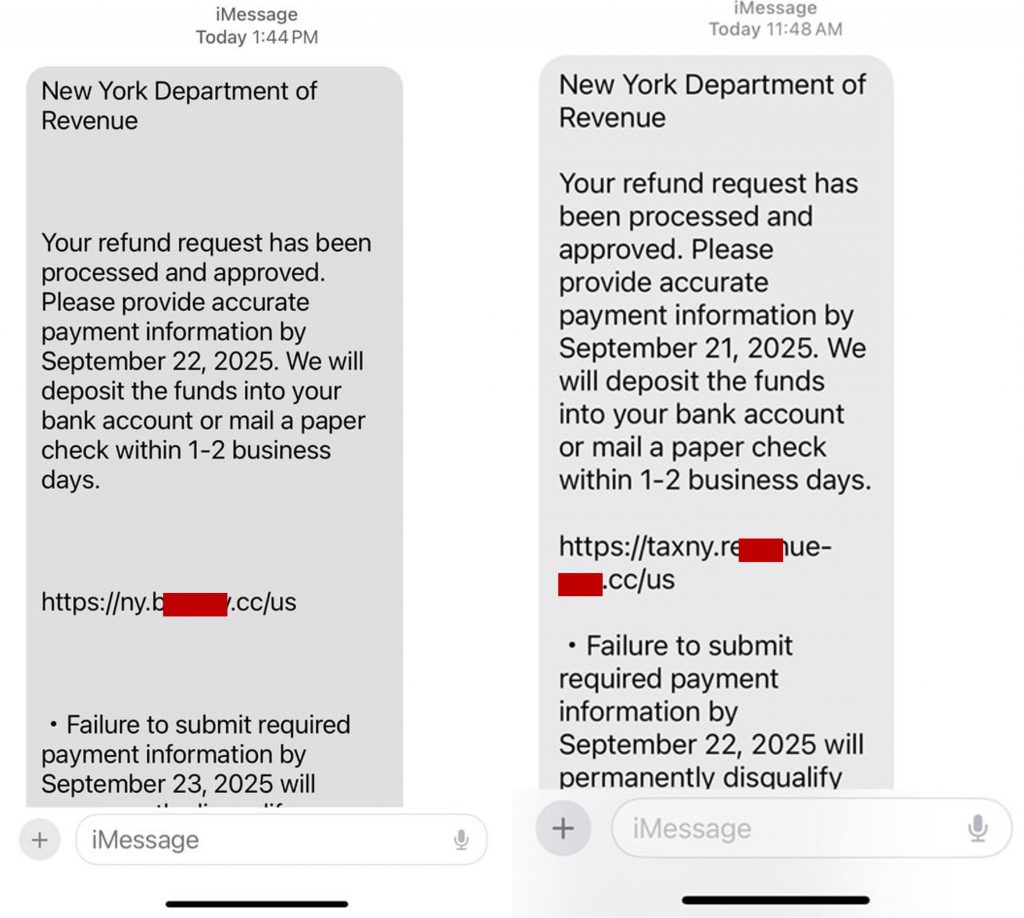
If you live in New York, there’s a sneaky text scam making the rounds that you should know about. Scammers are pretending to be from the “New York Department of Revenue”, sending out fake messages about tax refunds or unpaid bills to scare you into giving up your personal info.
How the Scam Works
It all starts with a text message that pops up on your phone. It looks official and might do one of two things to get your attention:
- Scare you: It might claim you have an overdue tax bill and threaten you with legal action.
- Excite you: It might promise you an unexpected tax refund that’s ready to be claimed.
Either way, the goal is the same: to get you to click a link. That link doesn’t go to a real government site, however — it goes to a fake phishing page designed to harvest your private information. They’re after data like:
- Your full name and address
- Social Security Number (SSN)
- Driver’s license or bank login details
- Credit card numbers
Once they have that, they can try to access your accounts or steal your identity.
How to Spot the Scam
Scammers might be clever, but they leave clues. Here are the four biggest red flags:
- They use the wrong name: This is the easiest catch. The real agency is the NYS Department of Taxation and Finance. Scammers are banking on you not noticing the slightly different “Department of Revenue” name.
- Government agencies don’t text you like this: A government agency never texts you out of the blue about your taxes. They almost always use official mail or have you log into your secure account on their website.
- They’re trying to make you panic: If a message feels urgent and is threatening you or promising something that sounds too good to be true, it’s almost always a scam. They want you to act before you have time to think.
- The link is a dead giveaway: The link in the text won’t be the real government URL (tax.ny.gov). It’ll be a strange, jumbled address or something from a link-shortening service.
Received a Text Like This?
- Don’t click that link. Don’t reply. Replying just tells the scammers that your number is active, and they’ll likely target you with more scams.
- Block the number. A quick and easy way to stop them from bothering you again.
- Report it. Help everyone out by forwarding the scam text to 7726 (SPAM). It’s a free service that helps your cell provider block these scammers. You can also file a report with the FTC at www.ReportFraud.ftc.gov.
If you’ve already clicked or entered information:
- Call your bank & credit card companies ASAP: Let them know what happened so they can monitor your accounts for fraud or even freeze them if needed.
- Lock down your credit: Contact one of the three credit bureaus (Equifax, Experian, or TransUnion) and ask them to place a fraud alert on your file. This makes it much harder for someone to open an account in your name.
- File an official report: Head over to www.IdentityTheft.gov to file a report. They’ll give you a step-by-step recovery plan.
- Update your passwords: If you reuse passwords, now is the time to change them, especially for your email and banking accounts.
Protect Yourself with Trend Micro ScamCheck
With the increasing number and sophistication of scams, staying one step ahead is more crucial than ever. Unfortunately, antivirus software alone isn’t enough. Introducing Trend Micro ScamCheck! Available for both Android and iOS, ScamCheck offers comprehensive protection from deceptive phishing scams, scam and spam text messages, deepfakes, and more:
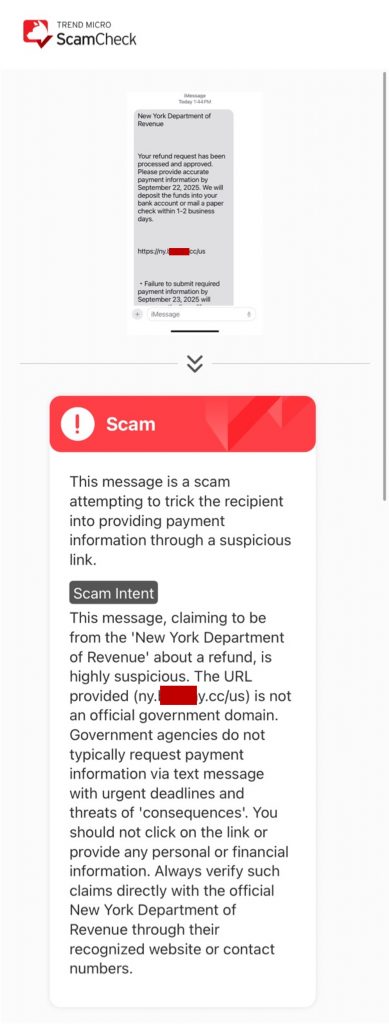
- Scam Check: Instantly analyze emails, texts, URLs, screenshots, and phone numbers with our AI-powered scam detection technology. Stay secure and scam-free. Just look at what ScamCheck thinks of this similar impersonation scam text:
- Scam Radar: Stay ahead of scams via early warnings before you fall victim.
- SMS Filter & Call Block: Say goodbye to unwanted spam and scam calls and messages. Minimize daily disruptions and reinforce your defenses against phishing.
- AI Video Scan: Detect deepfakes in real-time during video calls, alerting you if anyone is using AI face-swapping technology to alter their appearance.
- Web Guard: Surf the web safely, protected from malicious websites and annoying ads.
To download Trend Micro ScamCheck or to learn more, click the button below. As ever, if you’ve found this article an interesting or helpful read, please SHARE it with friends and family to help keep the online community secure and protected. Also, please consider clicking the LIKE button or sharing your experience in a comment below. Here’s to a secure 2025!
0 Comments
You Might Also Be Interested In...


![Branddealmall[.]com: Scam or Legit?](/_next/image/?url=https%3A%2F%2Fnews.trendmicro.com%2Fapi%2Fwp-content%2Fuploads%2F2023%2F03%2FiStock-1350892877-768x512.jpg&w=3840&q=30)